There’s been quite a bit of hype around the use of AI for vibe coding applications. Add in the use of a Ralph loop and we’re getting close to being able to automatically generate entire applications. But how much of this is hype and how much is reality. In this post I’ll walk through using a simple Ralph loop with the latest Uno Platform AI tooling to build an application from just a simple specification. I let it run overnight whilst I slept, so we’ll see what it produced and where we should go next.
So, here’s a quick overview of my setup:
- Running on Windows with VSCode
- Using a devcontainer setup under WSL to make sure Claude can’t go rogue on my PC
- I created the initial Uno Platform application using “
dotnet new unoapp -preset recommended” to create my application using the latest Uno Platform guidance (Material, MVUX, Navigation etc) - I’m using Claude Code
- I’ve added both Uno Platform MCP servers
- Validated that both Uno Platform MCPs are connected and have tools loaded
IMPORTANT: In order to get a good outcome it’s very important that the Uno Platform App MCP is connected and is reporting tools (there should be 11 at the time of writing). If the tools don’t load after 30 seconds (default timeout), it’s likely to be a result of one or two reasons:
- Not Authenticated with Uno Platform account. If you’re in a container/WSL you can launch the Studio app by running (substitute {version} with the version that you have. If none, run dotnet restore on your Uno Platform app):
dotnet ~/.nuget/packages/uno.settings.devserver/{version}/tools/manager/Uno.Settings.dll - Not able to resolve Solution or Project that references Uno Platform. Change to the directory that has the Solution (.sln) file before running Claude.
Whilst I’m using Claude in this example, the above setup, including the instructions for validating MCPs, applies to other AI agent CLIs (eg Codex).
Application Specification
Before I got started building the application I launched an interactive session with Claude and in Plan mode proceeded to describe the set of features for my application. I started with a brief description of the app:
“Help me determine the specifications for a financial tracking and planning application”
Through structured Q&A, , the following was established:
- Audience: Personal/household use
- Platforms: Web (WASM), Desktop (Win/Mac/Linux), Mobile (iOS/Android)
- Tech stack: Uno Platform (.NET/C#), SQLite, MVUX, Uno Material, LiveCharts2
- Data entry: Manual only (no bank sync/import)
- Storage: Local only (no cloud)
- Auth: Local account — username + BCrypt password + recovery phrase + optional PIN
8 features were defined (F1–F8):
| # | Feature |
|---|---|
| F1 | Account Management — multiple account types, offset accounts, reconciliation |
| F2 | Transaction Tracking — Manual vs Planned, recurring rules, interest charge computation |
| F3 | Planning (Scenario Modelling) — branching scenarios, projection engine, comparison view (replaced the original “Budgeting” feature at your request) |
| F4 | Net Worth Tracking — share holdings, properties, loan-secured property equity/LTV |
| F5 | Financial Goal Planning — savings targets, debt payoff, on-track status |
| F6 | Reporting & Visualization — 5 chart types, CSV export |
| F7 | Authentication & Security — registration, login, optional PIN, forgot-password flow |
| F8 | Settings & Data Management — categories, recurring rules, localisation, data export |
All 8 features were broken down into 42 issues on GitHub with full acceptance criteria and linked to their parent epics.
Basic Ralph
Sometimes when I hear Ralph discussed it ends up being overly complex, for example requiring the use of plugins. This is one of those topics that you can make as complex as you want. For me, it’s just a basic execution loop that works through a predefined list of tasks until completed.
With this in mind, the first thing to do was to create an ordered list of my GitHub issues for my Ralph loop to work through. Again, I used Claude for this with the following prompt:
Retrieve all open github issues. Sort them in the order that they should be completed (ignore epics) and write them to a file openissues.md
This created an openissues.md file with issues listed as follows:
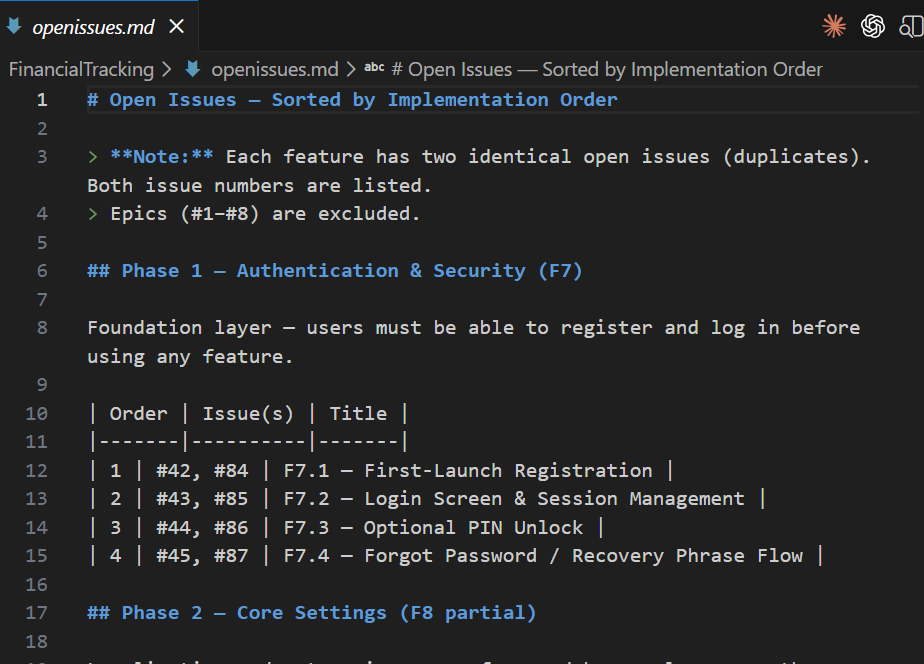
Now onto the Ralph loop itself. This is just a bash script (Credit to Dan Vega in his video The Ralph Loop Explained: Automate AI Coding Tasks in Java where I borrowed the structure of this script from).
#!/bin/bash

SLEEP_BETWEEN=10
LOG_DIR="logs"

mkdir -p "$LOG_DIR"

for ((i=1; i<=$1; i++)); do
  echo ""
  echo "****************************************"
  echo "Iteration $i of $1"
  echo "****************************************"

  outfile="$LOG_DIR/iteration_${i}.log"

  claude --dangerously-skip-permissions -p "@openissues.md @progress.txt \
0. Make sure uno and unoapp MCP are connected and that unoapp MCP has 11 tools available. After 30s if the unoapp MCP tools are not available, do not update GitHub issue and exit immediately. \
1. Read progress.txt to see what has been completed. \
2. Get the next issue from openissues.md. \
3. If there are no issues, output <promise>COMPLETE</promise> and exit. \
4. Complete the issue as required. \
5. If the issue requires code changes, make the necessary changes and commit them to GitHub. \
6. Ensure there are adequates tests for the changes you made. \
7. If the issue requires documentation changes, update the relevant documentation. \
8. Run the application and verify that the issue is resolved. Capture screenshots or logs as evidence of the fix. \
9. Update the GitHub issue with a comment describing how you resolved the issue, including any screenshots or logs. Close the GitHub issue as done. \
10. Append your progress to progress.txt with what you completed. \
11. If ALL tasks in openissues.md are complete, output <promise>COMPLETE</promise>. \
ONLY WORK ON ONE TASK PER ITERATION." > "$outfile" 2>&1 || {
    echo "Warning: Iteration $i failed (exit code $?). See $outfile for details. Continuing..."
    continue
  }

  cat "$outfile"

  if grep -q '<promise>COMPLETE</promise>' "$outfile"; then
    echo ""
    echo "openissues.md complete after $i iterations!"
    exit 0
  fi

  if (( i < $1 )); then
    sleep "$SLEEP_BETWEEN"
  fi
done

echo ""
echo "Reached $1 iterations. openissues.md may not be complete."
To execute you can just call
bash ralph.sh 100
This will run the loop 100 times, which in my case was enough to complete all 42, non-epic, GitHub issues.
And now you wait….. and wait…. and once you’ve verified that the first iteration doesn’t blow up and something is happening (you should see files being created and logs written)…. you can leave Ralph to it and come back in a few hours. I actually just went to bed and checked on the progress when I work up.
Ralph is Not a Designer
Actually, this should be Claude isn’t a designer, or at least is no substitute for a good UX designer. After working all night my Ralph loop and Claude had concocted what I’m sure is a fully functional app that meets my specifications. In fact, the over 1200 tests it created hopefully verifies that at least the functionality works. However, as the following screenshot of the MainPage will attest to, there was no thought towards building a usable interface.
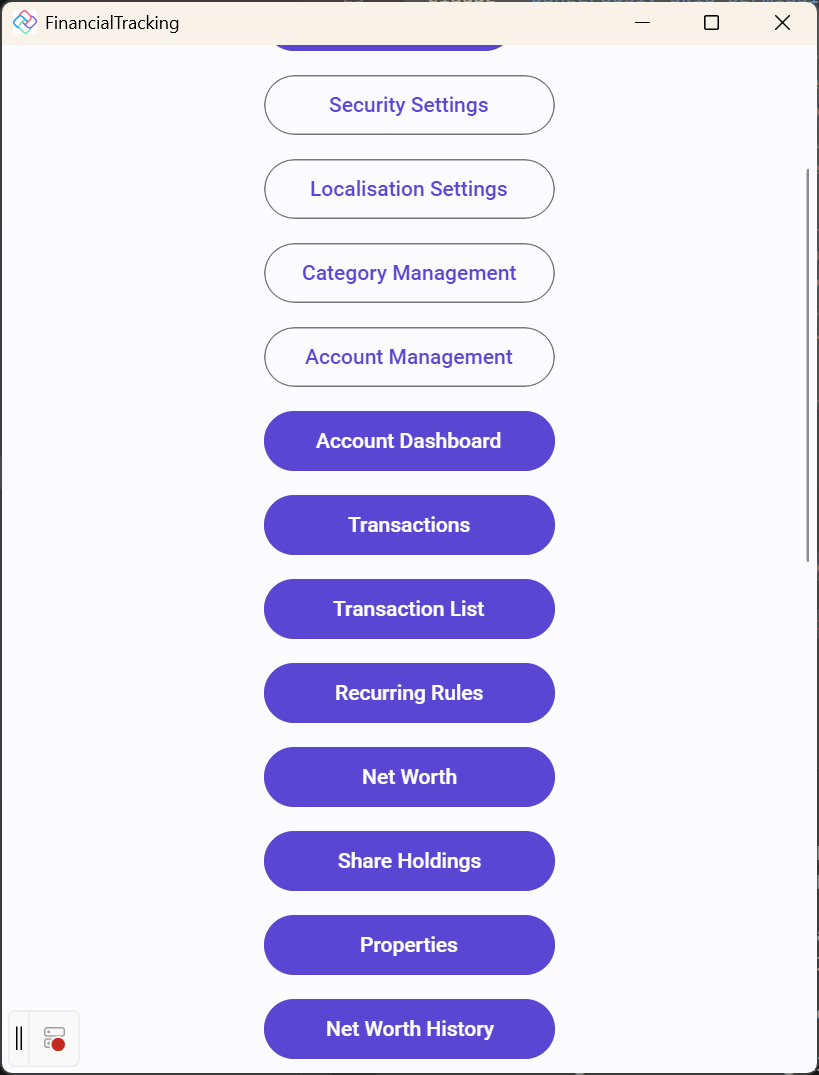
There’s no doubt that Claude, Codex etc are all super powerful tools but if you don’t provide them with enough input, you’re at their mercy. In this case I’d come up with a detailed specification but hadn’t spent time working out what the UX should be. I ended up with a basic, input based, UX where there were CRUD style interfaces for each of the elements of the data model.
Summary
There are two clear takeaways from this. Firstly, building apps, even cross platform apps, has been dramatically condensed – we’re talking weeks, perhaps even months, of development down to a mere few hours. Secondly, that more time spent coming up with specifications, application flow, designs, will significantly improve the quality of the outcome.
From here I clearly need to spend more time with Claude coming up with a better UX for the application. In the past, this would have required reworking the application to adapt it to the new UX. However, since it only took a few hours to build the first version, and I don’t need to worry or care about users having to upgrade to a new version, why not completely rebuild the application from scratch!!! I’ll leave you with this thought – whether it’s better to adapt or rebuild, now that development cost isn’t what it used to be.